
Key Takeaways:
- Year-Round Home Practice: A DIY golf simulator allows you to play and train at home in any season, providing convenient access to the game without weather or time restrictions.
- Simple Setup Process: Building your setup involves selecting a suitable space, utilizing reliable technology, installing a solid hitting mat, and implementing proper safety measures, allowing for both serious practice and family entertainment.
- Flexible Budget Options: Costs range from simple builds under 1,000 to advanced setups above 25,000, offering solutions for every golfer’s needs and preferences.
At Golf Simulator Depot, we take pride in offering reliable systems, quality components, and support that help golfers bring meaningful practice into their homes. Our selection is built around performance, durability, and ease of use, giving players confidence in every purchase. We stand behind products that deliver real value, and we work every day to make indoor golf accessible, enjoyable, and tailored to your preferred playing style.
Many golfers are exploring how to create a diy golf simulator that fits their space, goals, and budget. With the right mix of launch monitoring, hitting surfaces, netting, and display options, a personalized setup becomes more achievable than most expect. This overview introduces the essential components, planning considerations, and practical choices that shape a reliable home simulator, without revealing every detail of the whole process.
In this blog, we will explore the core components, planning steps, and practical setup choices that help you build a diy golf simulator that feels reliable, functional, and tailored to your home.
Key Space Requirements For An At-Home Golf Simulator
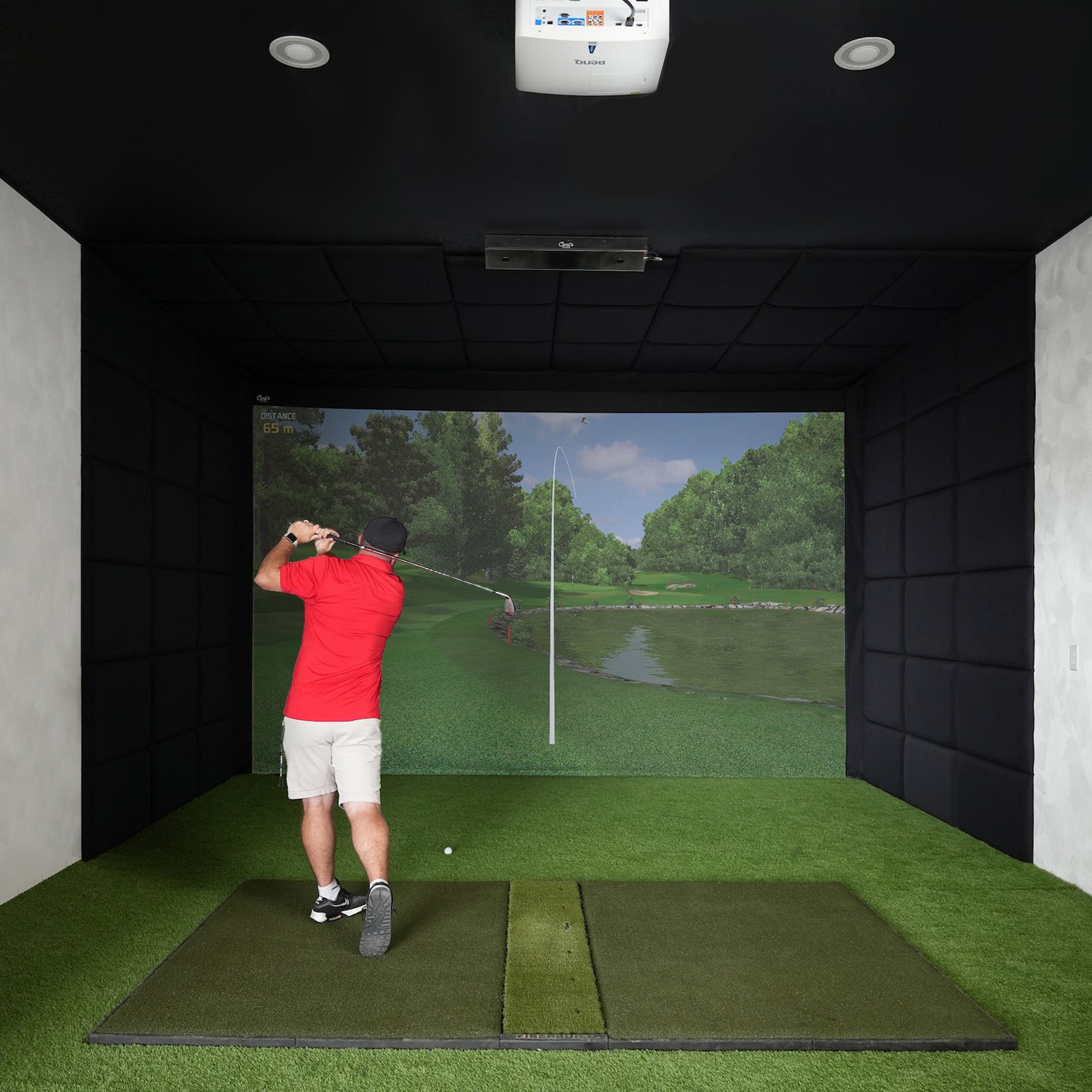
Setting up a DIY home golf simulator begins with understanding how your available space supports a smooth swing, accurate readings, and a safe, comfortable practice environment. Proper planning ensures that your setup feels natural and functional. Many golfers also review the recommended ceiling height for golf simulator, guidelines before committing to a room layout.
Ceiling Height That Supports A Natural Swing
Ceiling clearance determines how confidently you can swing indoors. Most golfers need at least 9 feet of height to complete a full backswing and follow-through without adjusting their technique. Taller golfers or those with a more powerful swing may prefer additional vertical space. Always test your full motion with your regular clubs before placing any equipment to confirm you have the freedom you need.
Width And Depth That Allow Full Movement
A functional simulator area typically measures around 10 feet in width and 15 feet in depth. This provides enough room to swing freely without contacting walls or nearby furniture. The added width also accommodates both left- and right-handed players, especially in shared spaces. Adequate depth supports safe ball travel, proper stance positioning, and a comfortable setup for your simulator components.
Appropriate Hitting Distance And Ball Travel
Maintaining a proper distance between your hitting mat and the impact screen or net is essential for accuracy and safety. Most home setups work best with a distance of 10 to 12 feet from tee to screen. This spacing enables launch monitors to read ball flight accurately and ensures the shot remains contained, preserving the realism and reliability of your practice sessions.
Safe Surroundings To Protect Your Space
Surveying the area around your simulator helps prevent accidental damage. Fragile items, windows, and exposed lighting should be protected or repositioned. Adding side netting or reinforcement around the hitting zone offers extra security. Shock-absorbing mats preserve your flooring and reduce wear on your clubs during repeated practice.
Accessibility And Comfort For Daily Use
A well-designed simulator space includes clear entry paths, room for equipment storage, and space for seating or observation. An organized layout keeps sessions enjoyable, whether you're practicing alone or hosting friends for virtual rounds.

How To Choose The Right Launch Monitor For Accurate Practice
Choosing the right launch monitor is one of the most critical decisions when developing a DIY garage golf simulator. The correct device ensures measurable improvement and helps you practice with confidence. Pairing your launch monitor with resources like golf simulator cost guides also enables you to plan smartly for long-term investment.
- Accuracy & Data Points: A reliable launch monitor measures ball speed, spin rate, carry distance, launch angle, and club path with consistency, providing golfers with the detailed insights needed to refine their technique and track meaningful progress.
- Space & Compatibility: Some monitors are designed for compact indoor areas, utilizing radar or photometric technology to accurately record shots while maintaining seamless compatibility with your preferred golf simulation software and available room layout.
- Ease Of Use: Launch monitors that offer quick setup, intuitive controls, and transparent displays help golfers stay focused on practice rather than troubleshooting, especially when using Bluetooth or Wi-Fi connectivity for device syncing.
- Budget & Upgrade Path: Launch monitors vary widely in cost, so choosing one that meets current needs while offering upgrade options allows golfers to expand into advanced analysis or multi-sport features over time.
- Realism & Feedback: Systems that deliver real-time metrics and visual shot representation create a more engaging environment, helping golfers connect data with ball flight and maintain consistent practice habits through immersive feedback.
Selecting a launch monitor that aligns with your space, goals, and playing style creates a dependable foundation for an effective diy golf simulator and year-round skill development.
Ready to bring golf home on your terms? At Golf Simulator Depot, we offer dependable gear, clear guidance, and everything you need to build a setup that fits your space and style. Whether you’re planning a full simulator room or starting a diy golf simulator project, we’re here to help you create a setup you’ll enjoy every day.
Software Features And The Real Cost Of A Home Golf Simulator
Software plays a significant role in shaping the quality, realism, and long-term value of your diy golf simulator. Understanding what these programs offer and how overall setup costs break down helps you build a system that delivers consistent results and an enjoyable play experience. Beyond features, many users explore golf at home to understand how software integrates into different room sizes and budget levels.
Course Libraries That Bring Variety To Every Session
Leading simulator software offers access to detailed course libraries that recreate famous golf destinations with remarkable accuracy. Courses like Augusta National, St. Andrews, and other global favorites feature lifelike terrain, natural contours, and vivid scenery. Some platforms also allow course additions, giving golfers an expanding list of virtual locations that keep practice engaging year-round.
Reliable Data That Supports Skill Development
Accurate shot analysis is central to effective indoor practice. Premium software interprets ball speed, spin rate, launch angle, and carry distance, presenting the data through clear visuals and performance charts. This level of feedback helps golfers refine technique, track improvement, and understand how swing changes influence ball flight.
Game Modes And Features That Enhance Enjoyment
Simulator software often includes driving range challenges, skill-building mini-games, and multiplayer modes that create enjoyable sessions for individuals, families, and friends. Real-time analytics and achievement-based features keep practice fresh while adding a competitive and interactive element.
Budget Ranges That Fit Every Home Setup
DIY simulator costs vary widely, giving golfers flexibility when planning their projects. Entry-level setups, which typically include a quality hitting mat, a basic net, and a simple launch monitor, can cost under $ 1,000. Mid-range builds, featuring higher-end launch monitors, impact screens, upgraded mats, and an entry-level projector, typically fall between $ 2,500 and $ 7,000. Premium setups, featuring advanced tracking technology, durable mats, HD projectors, and expansive course software, can range from $ 8,000 to $ 25,000 or more.

Calibration, Accuracy, And Safety Considerations For A Pro-Level Home Simulator
Once your diy golf simulator is set up, fine-tuning becomes the key to creating a realistic and consistent training environment. Proper calibration, accurate system settings, and thoughtful safety planning ensure your simulator performs reliably and supports confident practice at home.
Calibration Techniques That Support Realistic Performance
Accurate calibration begins with placing your launch monitor exactly as specified by the manufacturer, as small misalignments can significantly affect the data. Align your hitting mat with the target line and use test shots to verify distance and direction. Make minor adjustments to sensors or camera angles to ensure readings match your natural ball flight and swing tendencies.
Accuracy Settings That Improve Indoor Practice
Correct settings help your simulator generate dependable feedback. Select the correct ball type, confirm your club selections, and verify the tee height or alignment markers. Some systems allow adjustments for altitude or turf conditions, helping the indoor environment better reflect real on-course situations. These details ensure your distances, shot shapes, and spin readings remain consistent.
Maintenance Habits That Keep Data Reliable
Routine upkeep protects your investment and maintains accuracy. Clean sensor lenses, install software updates, and confirm alignment after repeated use. A few minutes of maintenance prevents misreads and keeps performance metrics dependable, allowing you to focus on improving technique with confidence.
Safety Measures That Protect Your Space And Players
Creating a safe practice area benefits everyone in the household. Establish a clear boundary to keep children and pets away during swings. Use a sturdy impact screen and side netting to contain shots and protect walls. Select a padded hitting mat to protect floors and absorb club impact. Always check ceiling height by testing your full backswing before practicing regularly.
DIY Golf Simulator: Step-By-Step Setup
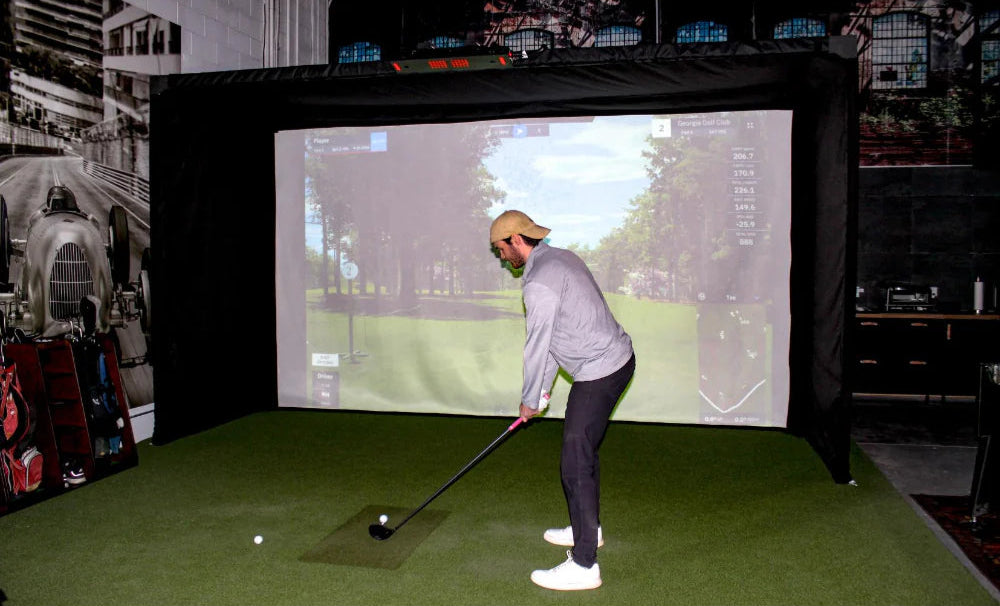
Building a diy golf simulator becomes much easier with a structured plan. Each component plays a clear role in creating a functional, accurate, and comfortable indoor practice environment.
- Choose Your Space Wisely: Select a room with a ceiling height of at least 9 feet and a width and length of approximately 10 feet, ensuring comfortable full swings and sufficient depth for safe ball travel.
- Select Core Technology: A reliable launch monitor tracks ball speed, spin, trajectory, and club data. Select a radar, photometric, or infrared system that suits your budget and integrates seamlessly with your devices.
- Gather A Hitting Mat & Impact Surface: Use a durable hitting mat that protects your floor and joints, paired with a secure net or impact screen capable of handling repeated shots safely and effectively.
- Set Up Projector & Display: Mount a projector or position a large TV to present course visuals clearly. Calibrate your display carefully to ensure accurate shot representation and a smooth viewing experience.
- Invest In Golf Simulation Software: Choose software compatible with your launch monitor that offers realistic course designs, precise performance tracking, and practice modes, along with regular updates for continued reliability.
- Fine-Tune Lighting & Ambience: Proper lighting helps launch monitors track accurately. Use adjustable LEDs, limit glare on the display, and manage natural light to maintain clear visuals during practice.
- Add Accessories For Realism & Comfort: Extras like putting greens, club racks, and speakers enhance the experience and create a practical, engaging space for productive solo sessions or friendly group play.
Following these steps helps you build a home simulator that supports consistent improvement and enjoyable practice throughout the entire year.

Final Thoughts
Building your own DIY Golf Simulator is about more than playing more golf; it’s about making the game part of your daily life. At Golf Simulator Depot, we believe every golfer should enjoy the excitement of practicing their swing, challenging friends, and playing iconic courses right at home. Indoor golf gives you total freedom. No weather worries, no schedule limits, just step into your golf space whenever you’re ready.
Whether you’re converting a spare room, garage, or shared family area, we’re here to guide you from setup to your first virtual round. Our intuitive products and dedicated support make it easy to create an authentic, reliable, and fun golf experience. Your home simulator becomes more than a training tool; it becomes a source of entertainment, friendly competition, and great memories all year long.
No matter your skill level, year-round golf is within reach. Bring the game home, and let every day feel like a golf day.
Frequently Asked Questions About DIY Golf Simulator
What is a DIY golf simulator?
A DIY golf simulator is a home setup that uses sensors, cameras, or radar to track your swing and ball flight, creating a realistic indoor practice and play experience.
How much space do I need for a home golf simulator?
Most golfers need a space around 10 feet wide, 10 feet long, and 8.5 feet high, ensuring comfortable swings and safe, open movement for various club types.
What equipment is essential for building a home golf simulator?
A basic setup includes a launch monitor, impact screen or net, projector, durable hitting mat, and simulation software, giving you accurate feedback and an immersive playing experience.
Can I build a golf simulator on a budget?
Yes, starting with a simple net, an entry-level launch monitor, and a hitting mat is affordable, with plenty of room to upgrade components gradually over time.
What are the best golf simulator launch monitors?
Popular options include the SkyTrak, Garmin Approach R10, and GC3, offering dependable tracking, user-friendly setup, and compatibility with leading golf simulation software platforms.
How do I choose the right impact screen?
Choose a tightly woven, durable screen that fits your room size, handles repeated use, and provides clear image projection, especially if you want strong visual quality.

